
The Southwest is a magical place, and the Sheraton Grand at Wild Horse Pass just south of Phoenix is no exception.
Here are the slides presented by Doug Winsby at the 41st annual NCMA conference in Chandler Arizona.
(Note that some of the slides are “built-up” and so may not display exactly as in the talk.)

I want to thank NCMA for inviting me to talk about one of my favorite topics.
I know some of you out there are thinking, “we’ve got that ACES stuff handled,” Right?
Well, I think the data receivers in this room will tell you that even the best software packages, yes, even AceMapper, can generate less than perfect files.
They might be perfect XML and validated against the latest VCdb, but they’ve broken other important rules and best practices that we should all be following.
So, I’m going to be touching on some of the biggest mistakes we run into, and maybe you’ll be able to tweak your process to generate even better ACES data in the future.

It’s been over a year now since the Legacy tables were removed from the VCdb. And even though we still occasionally get requests to convert Legacy files, overall, it’s been a really smooth transition for the industry.
That’s a testament to the hard work of the Technology Committee and all the great communication by the Association.
So, where once we had several vehicle tables, and many more delivery formats, we now have just two.
But what comes next? What comes after a “Sunset”?

Just for fun, I looked up the definition of the word “twilight” and this is what I found… wait, that’s not right!
“a period or state of obscurity, ambiguity, or gradual decline”
Well, that doesn’t sound good!
And to make matters worse, this was the example usage given with the definition…

Well, I hope that’s not true, I still have a daughter in college.
Clearly we need to come up with a better name for the next phase of ACES…
Okay, so what has the Committee been up to?
Let’s talk about some recent changes to the PCdb.
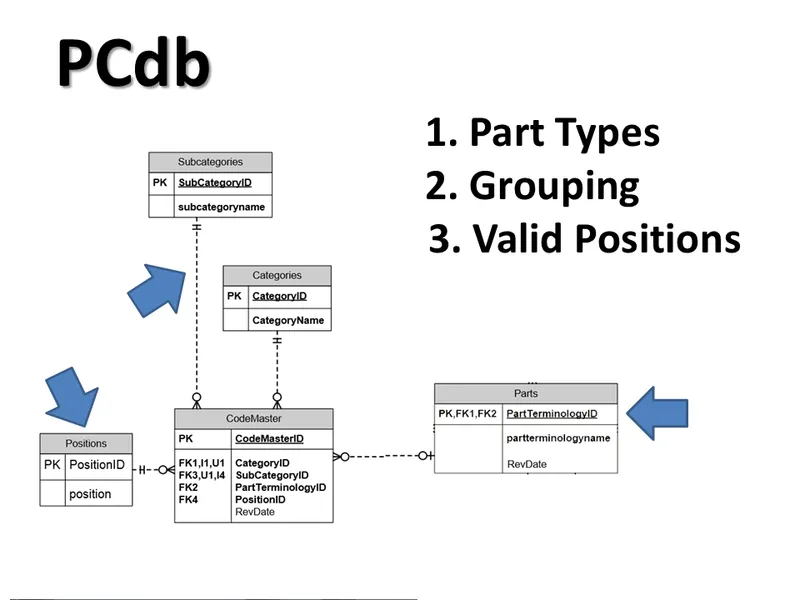
This is a visual representation of what’s contained in the PCdb.
Up until this year, it was just three things:
- Part Types
- Grouping of Part Types
- Valid Positions
But when PIES was developed, the Committee had a problem. They wanted to use the PCdb to define the part, but there are cases where a part could have be assigned to more than one part type.
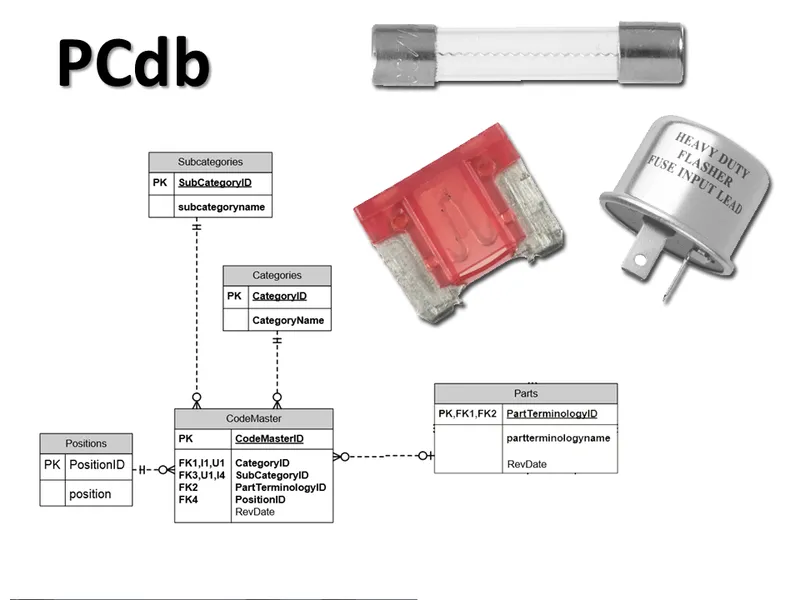
Fuses, for example, can protect different devices and so have multiple part types in the PCdb.
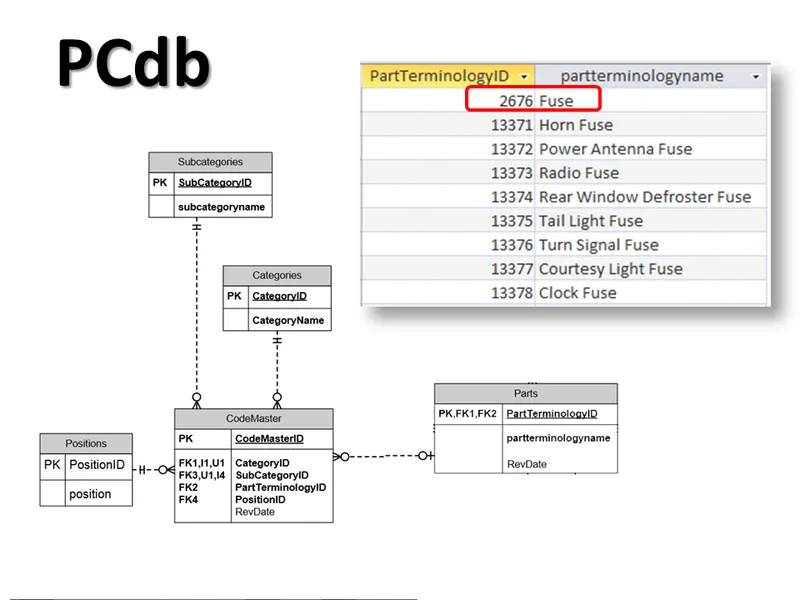
Note there are fuses for Horns, Radios, Tail Lights and Clocks.
But there’s also a generic one simply called “Fuse”.
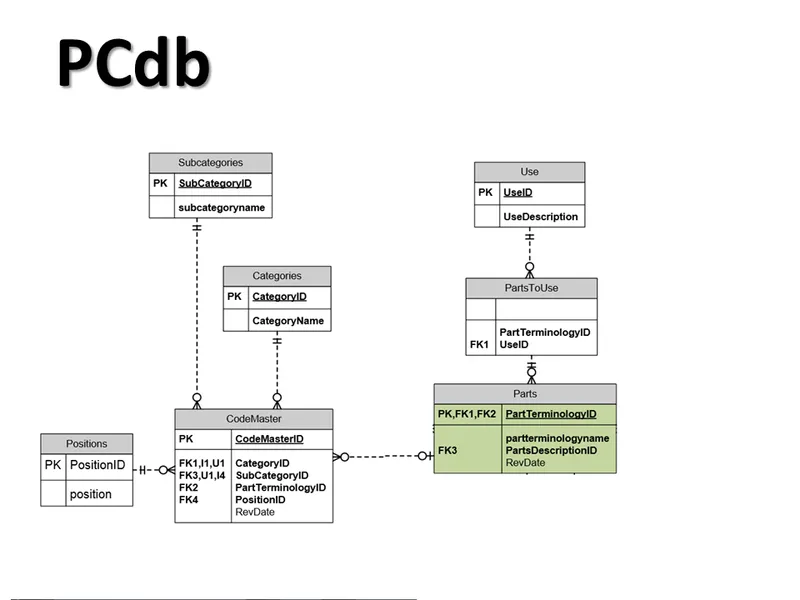
So the Committee added tables to indicate whether a PartType could be used for ACES files, PIES files or BOTH.
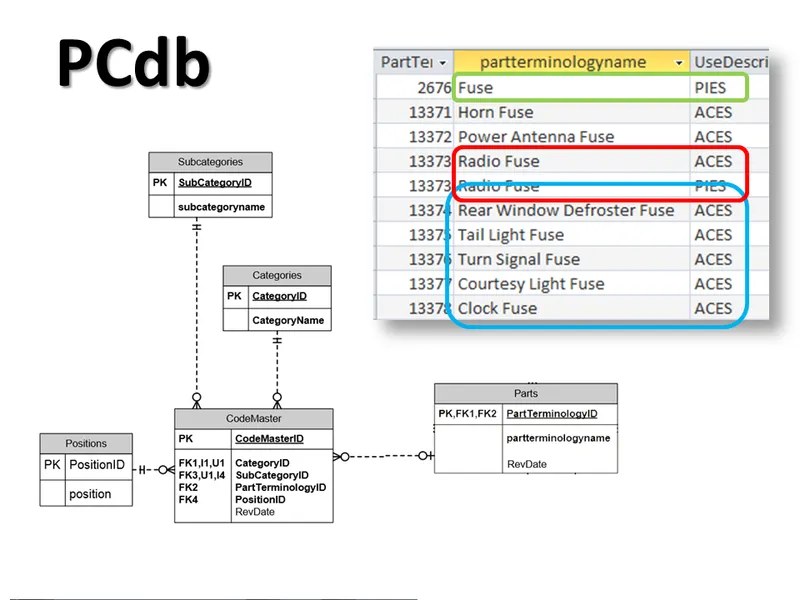
Note the generic “Fuse” part type should only be used in PIES files.
And the specific ones should only to be used in ACES files.
I’m not sure what’s going on here with the Radio Fuse… That looks like a mistake to me, but it does show how a part type could be used in both.
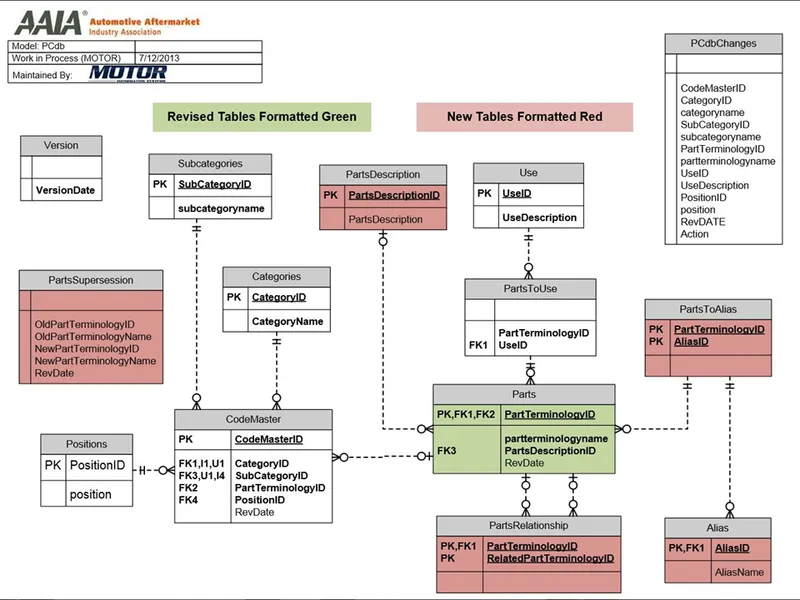
This is the complete database, with new tables shown in red.
It looks like a lot of changes … but really only three features were added.
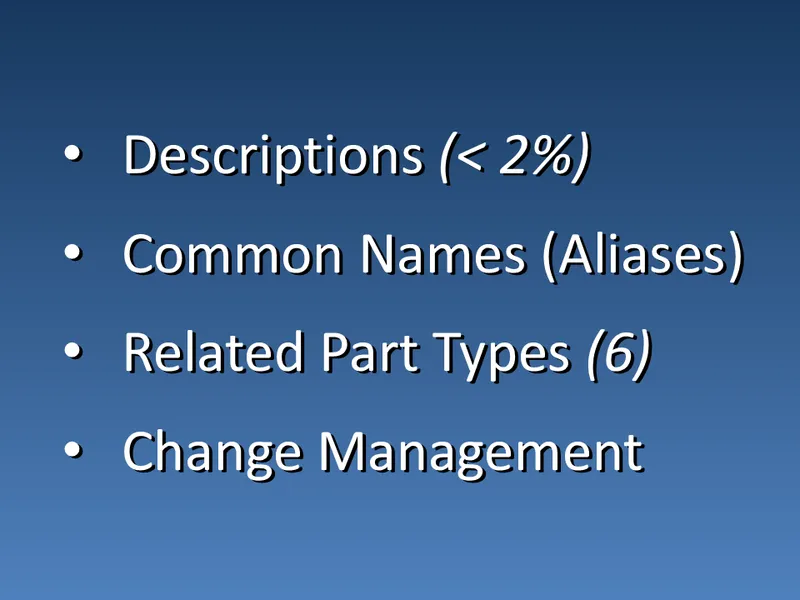
Descriptions provide a way to further define the part type. Currently, less than 2 percent are populated.
An Alias table could potentially provide alternative lookups for the Part Types, but there are only a handful defined right now.
Related part types can provide further grouping opportunities outside of the standard category/subcategory hierarchy. There are currently just a few samples defined in the database.
And lastly, some change management features were added to show part type supersessions and history.
Let’s switch gears now and talk a little about some common problems we see all the time in ACES files
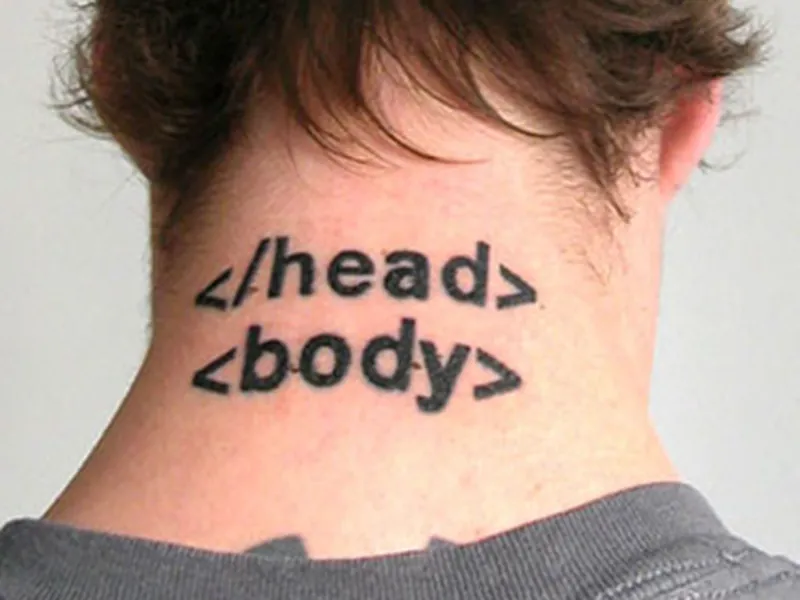
First of all, I’m surprised every year by how many invalid xml files we see.
I’m not talking about content problems, but just basic errors in xml formatting that are easily caught by a free xml validator. There is no excuse…
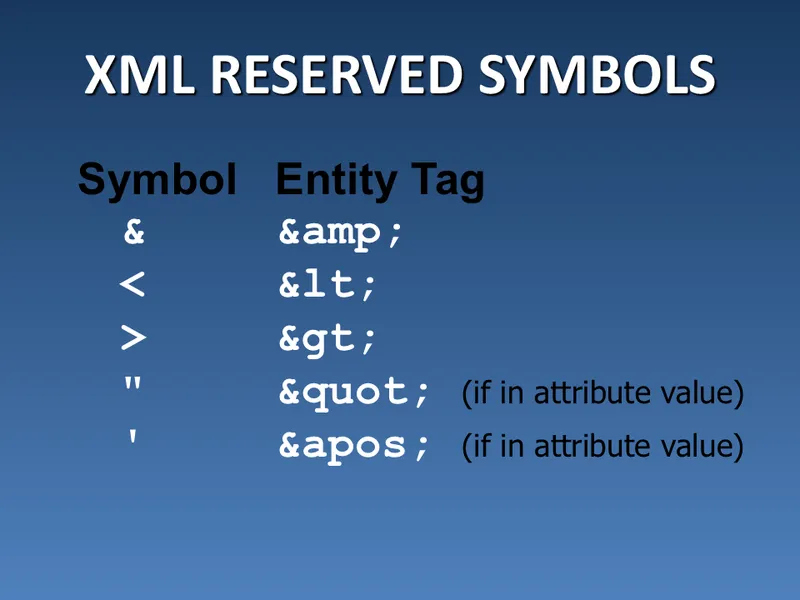
These reserved symbols are often the biggest problem. Especially the first one.
The ampersand must always be coded as shown on the right.
This is probably the number one content problem we run into. If something should be coded, code it.
Don’t try to hide it in the notes because it’s easier.
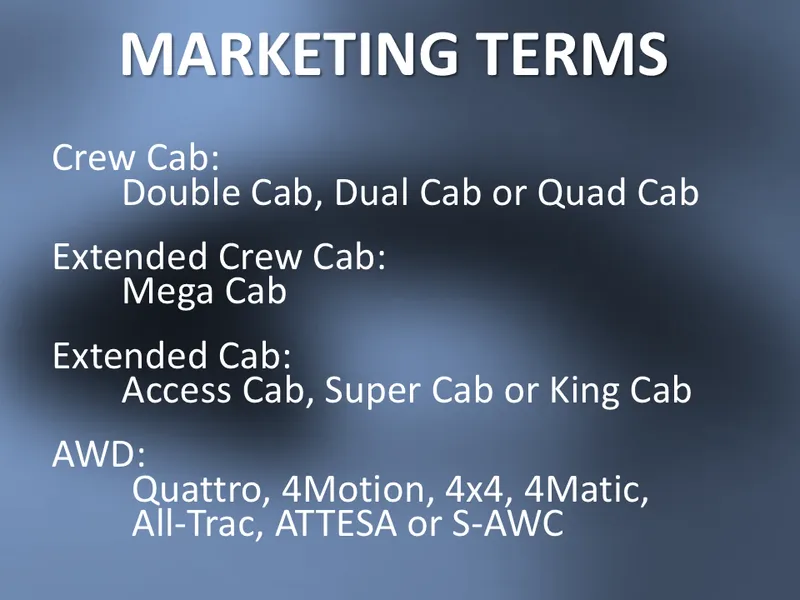
While many un-coded attributes are pretty obvious like AT and Sedan, others hide behind “marketing terms” such as these truck bodies and all-wheel drive trade names.
There are a ton of common abbreviations and acronyms used in the industry.
But just remember, something that seems obvious to you and me, may not be so obvious to your customer.
I took this next slide from a “parents shouldn’t text” website.

Well, That’s Fantastic.
There’s an approved abbreviation list delivered with the ACES documentation, but it was designed to be short and hasn’t been updated in years.
Your best bet is to include both the full text and the abbreviation in parenthesis.
This is a pet peeve of mine, probably because I see it all the time in files generated by well-known solution providers.
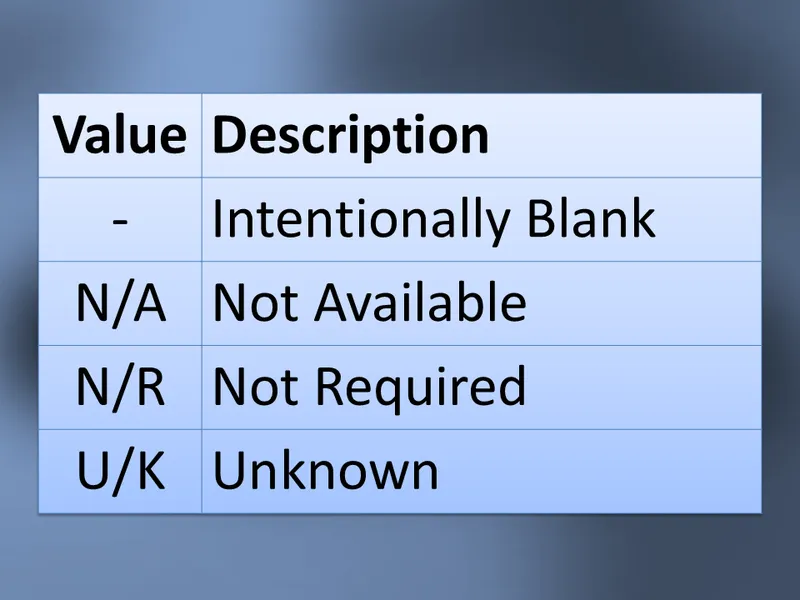
These four values should never be delivered. They are contained in the vehicle tables for information only.
An example of this we see all the time is a file where every application has an N/A position.

As an aside, one thing that makes checking this a little more difficult is that these id values are different in each table.
So, U/K in the FuelType table is “18”, but in the BodyType table is a “40”.
If I remember correctly, this was a “design by committee” decision. Some outspoken members were so afraid of having any “intelligence” in the IDs that we ended up with this mess.
In hindsight, we should have just made them all the same, starting at 1. That way, anything under 4, for example, would be IDs that have special meaning. As it is now, we need to perform another join to find out.
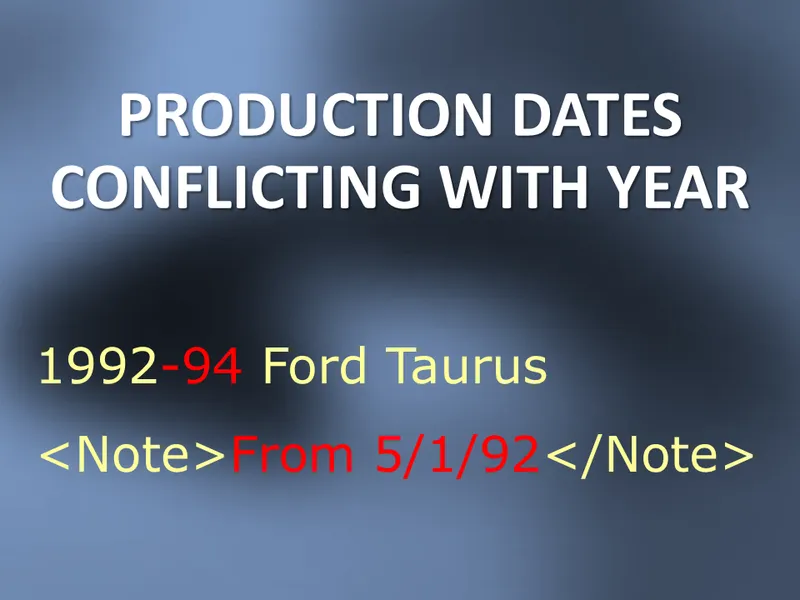
Production dates, or “split year” notes can cause this common problem, especially when dealing with year ranges.
As you can see here, the note should only apply to the 1992 application, but it’s often applied to the entire range.
So a lookup for the 1994 Taurus would have an extra, confusing note attached.
It’s always a good idea to keep production ranges in their own note tag (or better yet, to use a Qdb qualifier). This makes it easier to check for this problem.
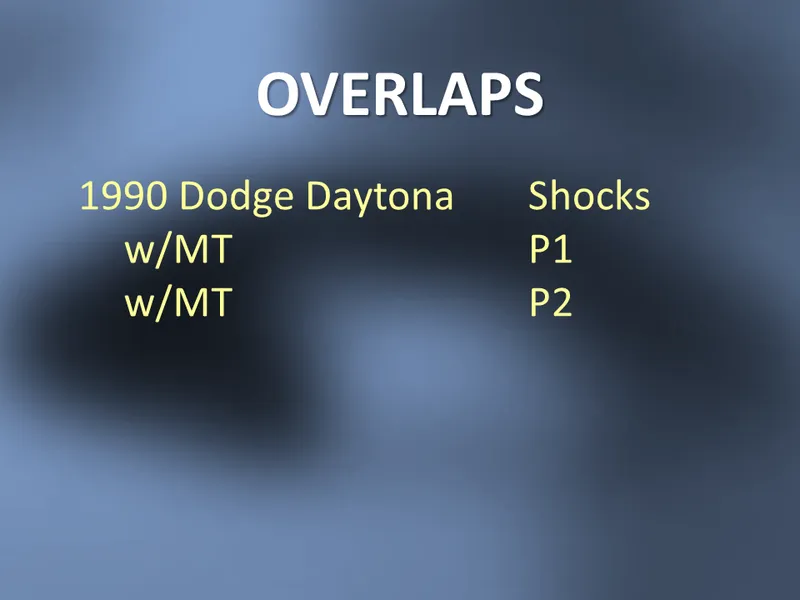
Two applications “overlap” when there is insufficient information to select just one part.
In this case, one of the applications should be auto trans, or maybe there’s a missing Position or Manufacture Label.
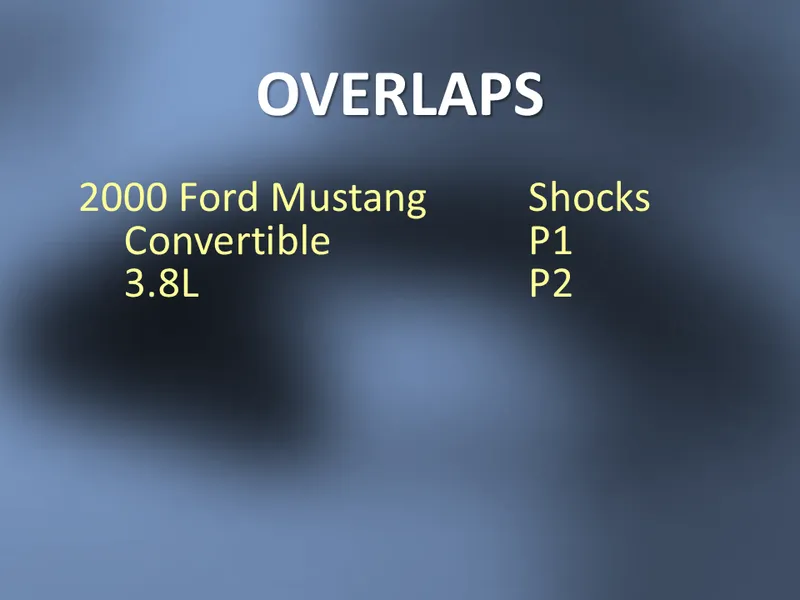
And in this case, what part do you use for a 3.8L Convertible?
The overlap is caused because a missing attribute family means ALL values in that family.
How many of you have kids in high school or college?
Well then, like me, you’ve probably been introduced to the strange world of memes. A meme is where you take some random picture with an implied message and then add your own text to it.
This is “Grumpy Cat”, and he’s reminding us that if you don’t list the application, no one will find it.
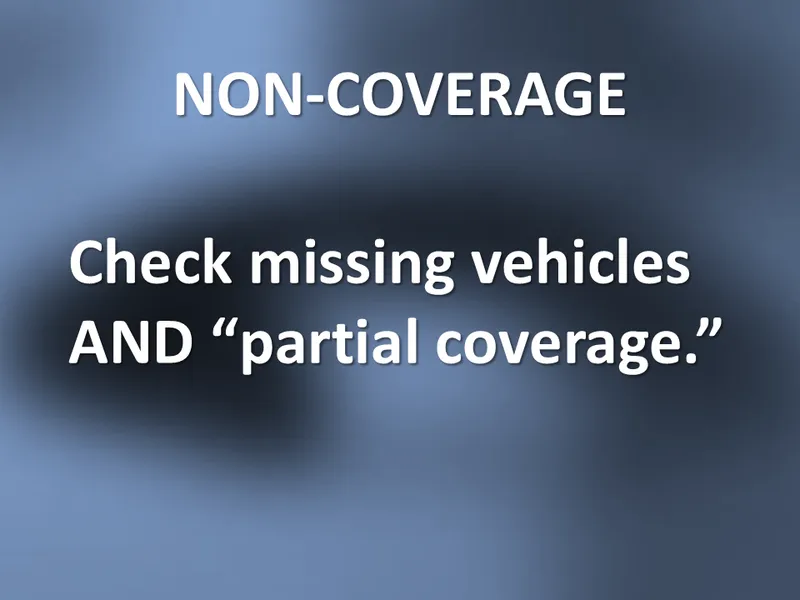
One of the great values of the VCdb is that it defines a universe of vehicles and their configurations. This information, then, makes it possible to determine missing coverage.
It’s fairly easy to look for missing vehicles for each part type in your file, but you should also check for partial coverage.
For example, you might have coverage for the Sedan, but what about the Wagon? This analysis can get tricky especially when checking for missing Positions since not all vehicles require all valid positions for that part type.

One of the most important ACES rules is to deliver only the information necessary to select the correct part.
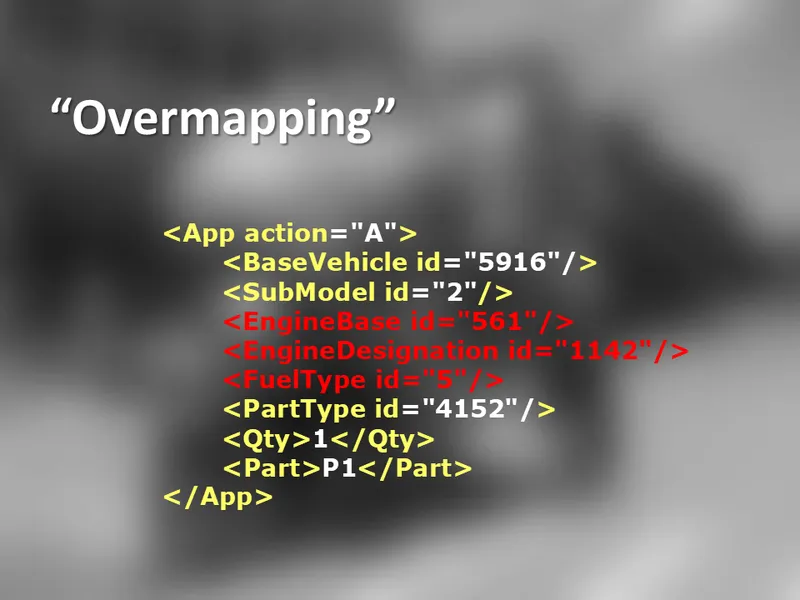
Delivering too much information is also known as “Over-mapping”.
In this instance, presumably, the engine and fuel type information is not required to select the correct part.
Normally, when we see this in a file, the same attributes are repeated in every application.

Kind of an obvious one here, but with all the recent changes to the VCdb, it becomes even more important to stay up to date.
Some receivers only use the latest VCdb to process ACES files, and if you used an older one, it could result in dropped applications.

Now I want to take just a few minutes talking about some of the issues to watch out for in the vehicle table.
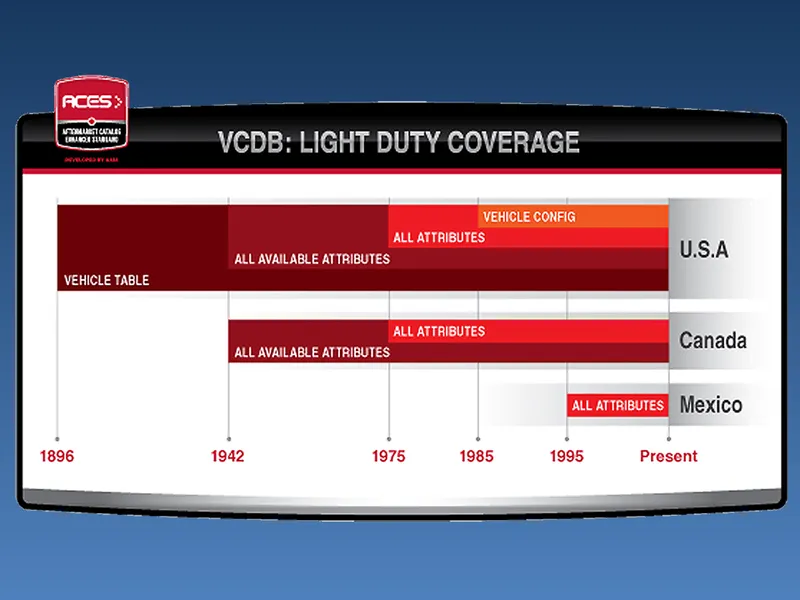
First of all, it’s important to understand that the vehicle table is not complete, and probably never will be. It just isn’t cost-effective to make it 100% accurate.
This means you should be really careful about making assumptions regarding the universe of options.
One reason for this problem is because the data was gathered from different sources and at different times.
Those years at the bottom show transition points and are often the cause of mapping issues.
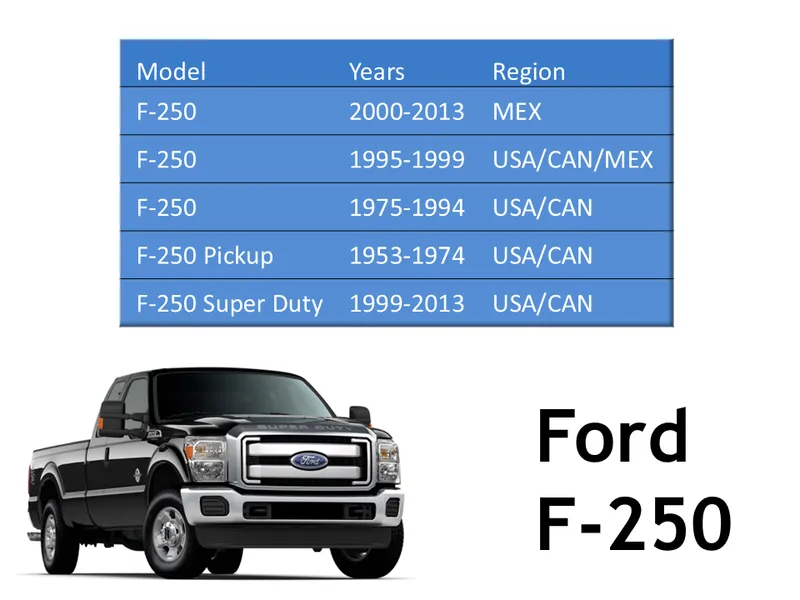
As an example, this screen shows how the Ford F-250 is represented in the VCdb.
Notice the different model names by region and year.
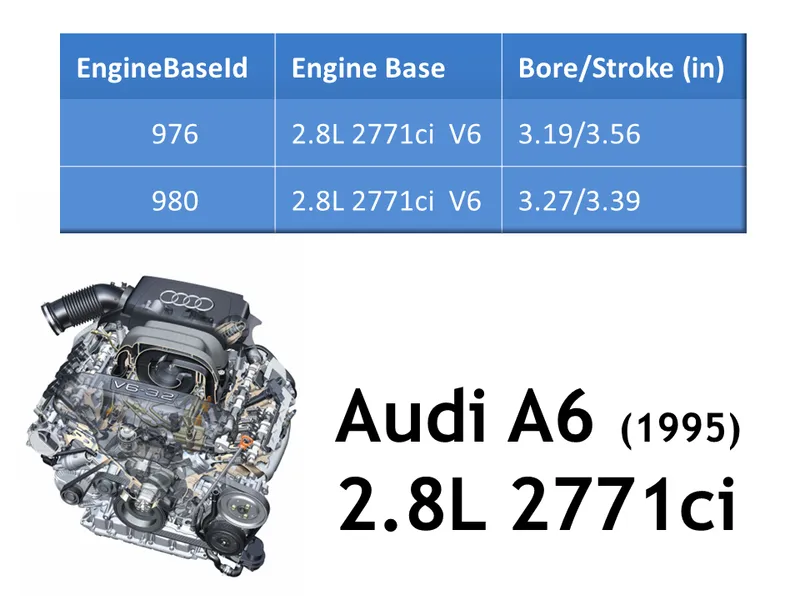
Designers of the VCdb caused a subtle problem when they included Bore and Stroke in the EngineBase table.
Here you can see there are two separate Engine Bases on the 1995 Audi A6 that are identical, except for the bore and stroke.
Except for a few engine parts, most applications don’t need that level of detail. But you must map to both engines, or you will drop coverage.
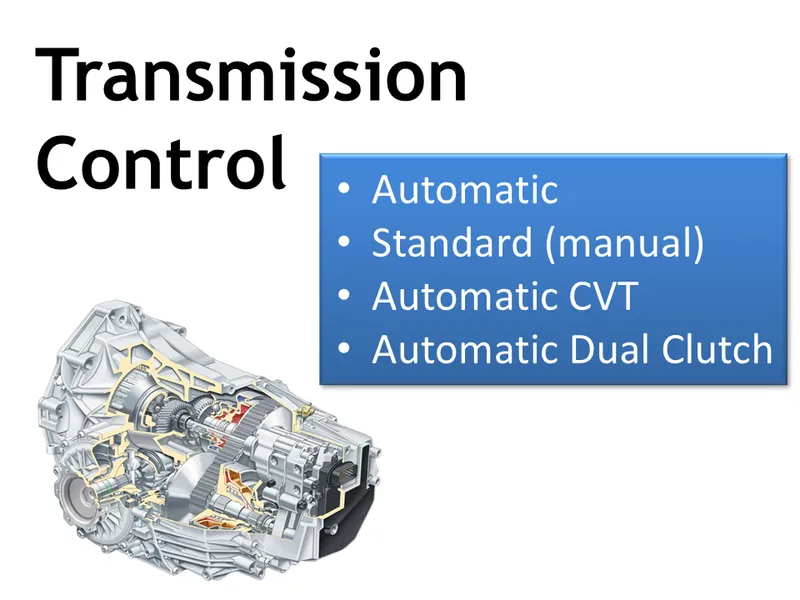
The Transmission Control attribute family is also a cause for some confusion.
Since the recent addition of CVT and Dual Clutch options, that family no longer contains mutually-exclusive attributes.
In other words, having one value assigned should exclude the possibility of all the others. But in the case of Automatic, it overlaps with CVT and Dual Clutch.
I found dozens of cases in the VCdb where vehicles have both Automatic and CVT or Dual Clutch valid options. If you map these as just Automatic, you will lose coverage.

No, not aliens, just someone trying to fit a square peg into a round hole.
We really should have changed the structure of the database (or maybe not validated CVT and Dual Clutch at all, but just added them to the Qdb).
Finally, I’d like to take aminute to talk about the concept of using actual ACES ids natively in your master application data.
On the surface, this looks like a great way to remove the mapping process from your catalog production.
Remember, though, that ACES was designed, first and foremost, as a way to deliver application data.
It is a delivery mechanism.
There’s no problem having your vehicle data ACES-based, but you need to find a way to keep it “loosely coupled” so you’re not negatively impacted by changes in the VCdb (which are constant).
It is literally a moving target. Let me show you what I mean…
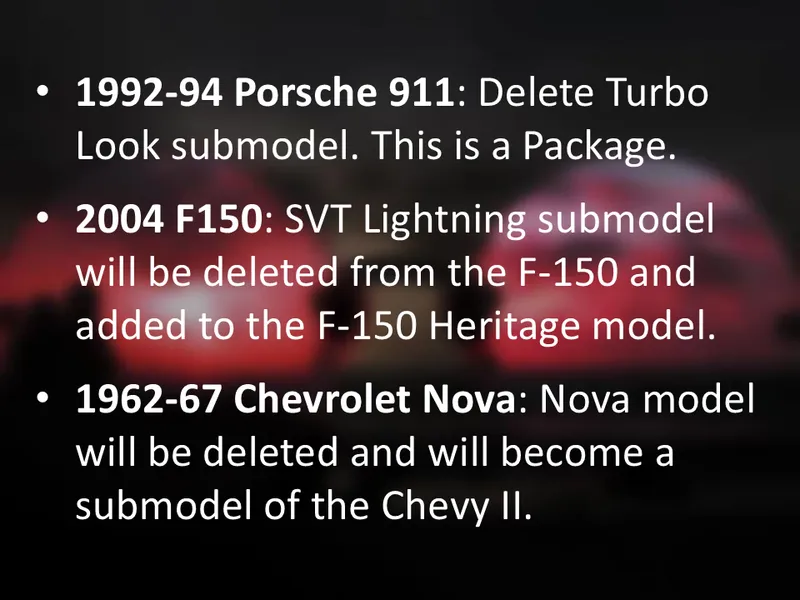
Here’s just a small sample from a recent release.
Models and Submodels were dropped and moved around.
You should expect than anything can change, and you don’t want to allow these external changes to break your catalog.
You want to have a process you can count on and control. So I would recommend using ACES terminology but keeping your own IDs. This allows you to have a rock-solid, consistent catalog, but validated against a the industry research included in the VCdb.

Well, that’s fantastic!
So, unlike this guy, my advice would be for you to set up a procedure that leaves few things to chance. And won’t hurt much when things do change that are outside your control.
Sorry for leaving you with that last image.
Thank you for your attention this morning, and for all you do to keep the data flowing.